With the world moving at a breakneck pace today, mobility and performance go hand in hand, and demand for thin and light laptops has seen a tremendous hike. Professionals, students, and artists alike are searching for machines that will match their on-the-go lifestyle without affecting their purse strings.
This is where MSI’s Modern series steps in—delivering an impressive blend of sleek design, powerful internals, and practical pricing. Known primarily for its gaming laptops, MSI has diversified its lineup with the Modern series to cater to everyday users who prioritize portability, productivity, and reliability.
The MSI Modern 14 and Modern 15 series walk a fine balance between form, performance, and price—making them one of the top thin and light laptops in the ₹40,000–₹60,000 segment in India.
Let’s get into depth about what makes the MSI Modern series such an attractive choice for 2025.
Design and Build Quality: Sleek, Minimal, and Professional

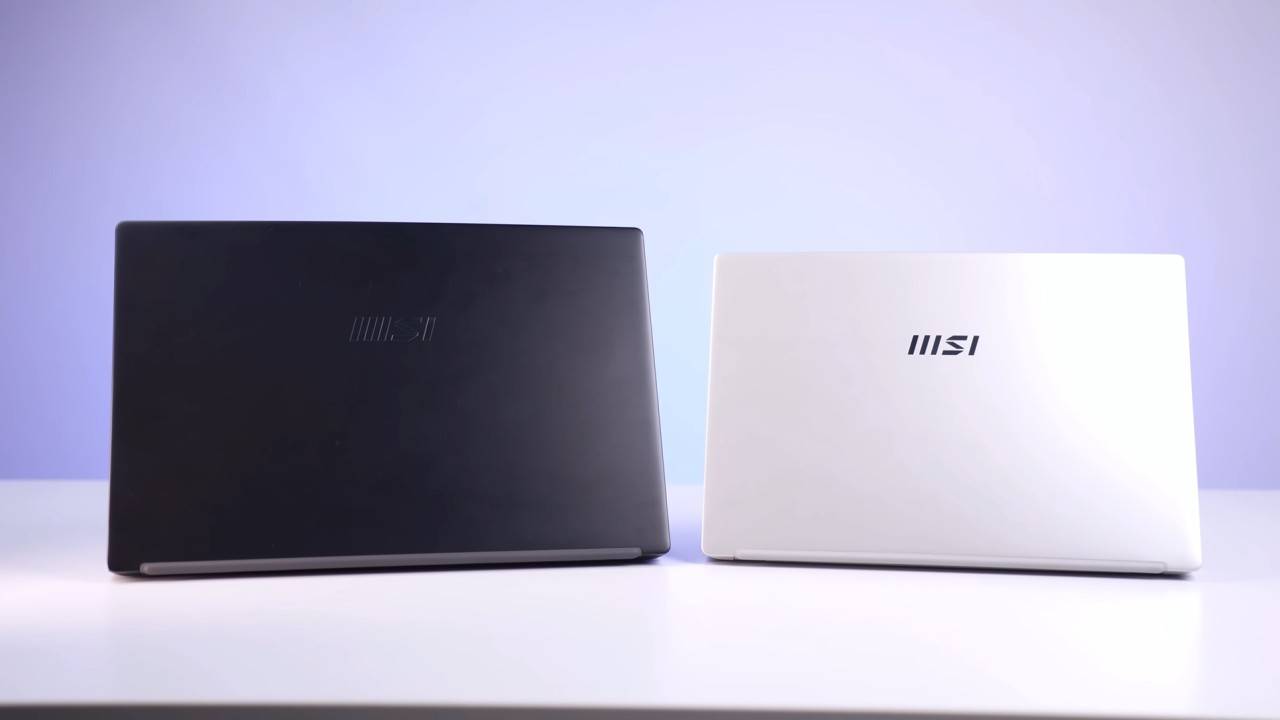
The MSI Modern series is the first thing that catches your eye because of how minimal but high-end it appears. The lid has a brushed aluminum finish that gives it a touch of sophistication, while the simple MSI logo gives it an air of understated elegance.
Weight: Approximately 1.4 kg (Modern 14) and 1.7 kg (Modern 15)
Thickness: Less than 20 mm, which makes them extremely light and easy to carry about
Build: Aluminium and plastic build, with high-end plastic
Even though the chassis is lightweight, it feels strong with very little flex on the keyboard deck. The hinge system is silky smooth and built to last and opens 180-degree lay-flat style, perfect for presentations or collaborative work sessions.
The design of the Modern series appeals to professionals and students alike. Whether in a college campus library or an office conference room, it appears perfectly at home.
Display: Crisp and Clear for Everyday Use

The MSI Modern 14 and Modern 15 both feature a Full HD (1920×1080) IPS-level display, which offers crisp visuals and extensive viewing angles.
The display isn’t designed for color-critical purposes (it covers approximately 45% of the NTSC color gamut), but it’s more than enough for office work, web surfing, and binge-watching Netflix.
Highlights:
- Full HD resolution
- Anti-glare coating
- Slender bezels for immersive viewing
- Reasonable brightness (~250 nits)
For a laptop priced below ₹60,000, this is a decent panel. It provides sharp text, decent contrast, and proper whites, which are well-suited for productivity and content viewing.
Performance: Powerful, Smooth, and Bold

Performance-wise, the MSI Modern series delivers a bold punch on its budget. Depending on the model, you can have a maximum of an Intel Core i7-1255U (12th Gen) processor, which is great for multitasking and power efficiency.
Even the i5-1235U and i3-1315U models provide good everyday performance to the average user.
Key Specifications (Example: MSI Modern 15 B13M-290IN):
- Processor: Intel Core i5-1335U (13th Gen)
- Graphics: Intel Iris Xe Integrated GPU
- RAM: 8 GB DDR4 (expandable up to 64 GB)
- Storage: 512 GB NVMe SSD
- OS: Windows 11 Home
For users of applications such as Microsoft Office, Visual Studio Code, Figma, or even light machine-learning libraries like OpenCV and MediaPipe (as in AI development), the Modern series takes care of everything with ease.
The NVMe SSD provides speedy boot times and responsive app launches, while 8 GB RAM offers silky-smooth multitasking. For heavy users, the option to upgrade RAM is a huge gain—especially for long-term usage. option to upgrade
Real-World Use: Ideal for Students, Developers, and Makers
In the real world, the MSI Modern laptops excel because of the blend of portability and powerful insides. From being a student taking online classes, a software developer typing through the day, or a freelancer editing articles, online classes keep pace with the level of consideration.
For activities such as Python programming, AI testing, or tasking apps, the laptop runs quietly and effectively. The thermal system ensures that even when loaded, the fans are relatively quiet, keeping working conditions at comfortable levels.
This makes it perfect for:
- Students requiring a portable, all-day device
- Developers and programmers working with light frameworks
- Office workers with spreadsheets, presentations, and meetings
- Leisure users who prioritize style and portability
Keyboard and Trackpad: Typing Comfort at Its Best
MSI has a reputation for providing comfortable keyboards, and the Modern series follows suit.
The keyboard has well-spaced keys with good tactile feedback and travel. It also has white backlighting, which makes it easy to work in low-light settings.
The trackpad is large and accurate, and it accommodates multi-touch gestures. It is smooth and responsive—ideal for scrolling, zooming, or window switching.
For writers and developers, this trackpad-keyboard combination boosts productivity without an external setup.
Connectivity: All You Need, Nothing You Don’t
Even with its thin design, the MSI Modern doesn’t skimp on connectivity. You have all the necessary ports securely placed on both sides.
Available ports:
- 1 × USB Type-C 3.2 Gen 2
- 2 × USB-A 3.2 Gen 2
- 1 × USB-A 2.0
- HDMI output
- MicroSD card reader
- Audio combo jack
This diversity lets you easily plug in peripherals, external monitors, or storage drives without needing to use dongles—something you find hard to come by with most thin laptops today.
Battery Life: Consider Battery Life
Battery life is an important feature of any thin and light laptop. The Modern line features a 3-cell 52 Wh battery, which will usually provide 6–8 hours of mixed use—adequate for a complete workday if you adjust your brightness and workload accordingly.
MSI’s Battery Master and MSI Center software allow users to optimize battery health and performance modes based on needs.
Quick facts:
- 6–8 hours battery life (light to moderate use)
- 65 W fast charger (Type-C on select models)
- Intelligent power-saving features
For a budget-friendly laptop, this endurance easily competes with higher-priced ultrabooks from HP, ASUS, or Lenovo.
Audio and Webcam: Practical and Functional
The MSI Modern has two 2 W speakers with Nahimic 3 Audio Enhancer tuning for crisp vocals and balanced sound. Bass isn’t loud, but it’s sufficient for meetings, YouTube, or listening to music casually.
The 720p HD webcam does its job reasonably well for video conferencing or virtual classes. With good lighting, it gives clear images—albeit not perfect for serious streaming.
Software Experience: Clean and Useful
One of the standout features of the MSI Modern series is its bloat-free Windows experience. You are given Windows 11 Home and MSI’s utility programs, such as MSI Center for monitoring performance, battery, and system health.
You can switch between modes such as
- Balanced Mode (default)
- Performance Mode (boosts CPU when plugged in)
- Silent Mode (lowers fan noise and power consumption)
So much control is unusual in this price range.
Comparison: MSI Modern vs Competitors
| Laptop Model | Processor | Weight | RAM/Storage | Price Range | Verdict |
| MSI Modern 14 C13M | Intel Core i5 13th Gen | 1.4 kg | 8 GB / 512 GB | ₹52,000 | Best portability |
| HP 15s | Ryzen 5 5500U | 1.7 kg | 8 GB / 512 GB | ₹47,000 | Great display, less compact |
| ASUS Vivobook 15 | Intel i5 12th Gen | 1.7 kg | 8 GB / 512 GB | ₹55,000 | Stylish, average battery |
| Lenovo IdeaPad Slim 3 | Ryzen 5 7520U | 1.6 kg | 8 GB / 512 GB | ₹49,000 | Balanced option |
| Acer Aspire 5 | i5 12th Gen | 1.8 kg | 16 GB / 512 GB | ₹59,000 | More power, heavier |
When compared to its rival, Somethingdern is notable for its minimalist design, robust build, and user-upgradable RAM—something that most other brands of this price do not have.
Who to Buy the MSI Modern Laptop For
The MSI Modern is meant for a particular category of users—individuals who require a portable, great-looking, and powerful machine without paying top dollar.
You might want to purchase the MSI Modern 14/15 if you:
- Are a student looking for a light laptop for study and project work
- Are a coder or programmer coding in Python, AI, or web development
- Are a professional who prefers portability and looks
- Are a content creator doing light photo/video edits and graphic tools
- Are a busy traveler who requires an all-day efficient companion
But if you’re an avid gamer or anticipate heavy video rendering, you can consider MSI’s gaming-focused Bravo or Katana line with their own GPUs.
Pros and Cons
Pros:
- Light and premium build
- 12th/13th Gen Intel CPUs provide robust performance
- Spacious backlit keyboard
- RAM and storage are upgradable
- Long battery life
- Clean software experience
Cons:
- Below-average color accuracy (not suitable for designers)
- The webcam is not very impressive
- No specific GPU options available below ₹60K.
- Very few deliveries in small cities: The Ideal Thin & Light Budget Laptop
The MSI Modern line shows you don’t have to break the bank to have a powerful, good-looking, and light laptop. It gets the ideal balance between performance, portability, and price right and is currently one of the best laptops available in India under ₹60,000.
With sleek aesthetics, efficient 12th/13th Gen Intel processors, upgradeable hardware, and dependable battery life, it’s a laptop that caters equally well to students, developers, and everyday professionals.
If you’re looking for a thin and light laptop on the MSI Modern 14 or 15 should definitely be on your shortlist.
Final Thoughts
In 2025, there are plenty of thin and light laptop options, but incredibly few achieve the balance of the MSI Modern series. It’s fashionable without being showy, mighty without being chunky, and affordable without making big sacrifices.
If mobility, dependability, and straightforwardness are important, then the MSI Modern is an easy choice in the sub-₹60,000 segment.