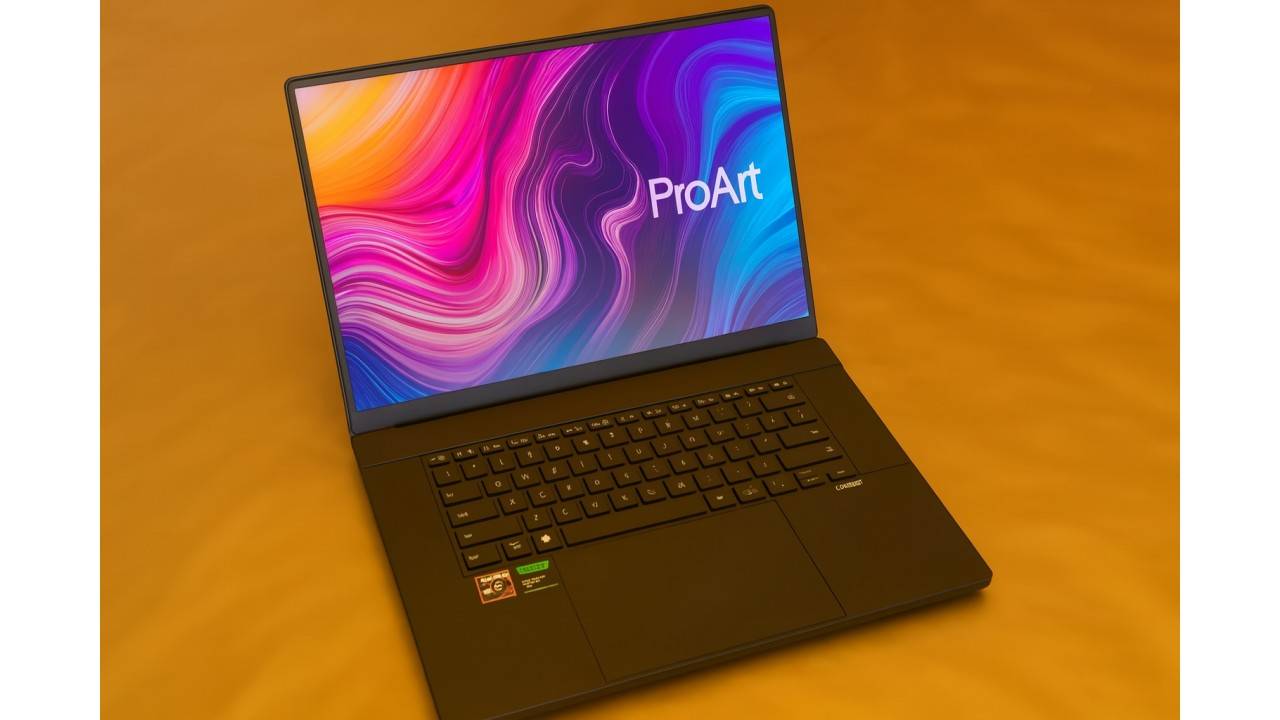
In 2025, Asus jumped back into the creator-laptop fray with one of its most ambitious machines to date: the Asus ProArt P16 (2025). This workstation-grade laptop powerhouse is targeted at filmmakers, 3D artists, designers, and professionals seeking raw performance and captivating color accuracy, along with state-of-the-art AI features. But the biggest question floating around remains simple: “Can it dethrone the MacBook Pro?”
With Apple’s strong hardware-software integration, unmatched battery efficiency, and reliable performance, the MacBook Pro has always ruled the roost for creator laptops. Now, the Asus ProArt P16 (2025) attempts to challenge Apple head-on with its AMD Ryzen AI processors, an NVIDIA RTX 50-series GPU, and a breathtaking OLED display.
This review breaks everything down, from performance and display to build, thermals, GPU options (including the RTX 5070), battery life, and real-world usability, to help you understand whether this laptop is a MacBook Pro killer or just a powerful alternative.
Design and Build Quality of Asus ProArt P16 (2025)

The ProArt P16 retains the classic understated Asus ProArt looks: clean, minimalist, with subtle gold accent lines and a professional finish. It’s surprisingly sleek, given how much high-end hardware it holds inside. It’s not as thin as the MacBook Pro, but that’s to be expected from a machine running a discrete RTX GPU.
The chassis is made with high-quality materials, and the laptop passes MIL-STD-810H durability tests—a definite plus if you’re a creator who travels a lot.
Most of all, it’s the keyboard and touchpad experience that stands out. The keys have excellent travel, and the touchpad is huge, smooth, and responsive—not quite to the level of Apple’s legendary trackpad, but not far behind either.
A Display Designed for Asus ProArt P16 (2025)
If there is a single category where the ProArt P16 goes beyond the MacBook Pro, that’s display.
You get a 16-inch 4K OLED panel, 3840 x 2400, with:
- Hz refresh rate
- 1600 nits peak brightness
- 100% DCI-P3 coverage
- Pantone validation
- ΔE < 1 color accuracy
- True Black HDR certification
- Touch support
The colors are extremely accurate, blacks are deep and inky, and the overall visual experience is among the best you can get in 2025. For photographers, editors, and digital artists, this display is truly a dream.
The OLED panel of the ProArt P16 gives it inherently better contrast and deeper blacks versus the mini-LED display in the MacBook Pro, while the MacBook Pro offers better sustained brightness and a bit more consistent HDR.
Performance of Asus ProArt P16 (2025): Ryzen AI + RTX 5070/5090 Power

The ProArt P16, 2025, is fitted with AMD’s Ryzen AI 9 HX 370 processor, a CPU with 12 cores and 24 threads, to handle AI and creative workloads. This chip contains a very powerful built-in NPU, boasting 50 TOPS, which considerably boosts AI applications.
Coupled with this processor, the laptop offers a number of GPU configurations, including
NVIDIA GeForce RTX 5070 (Laptop GPU)
Yes, one of the most popular configurations comes with an RTX 5070 paired with 8GB GDDR7.
- This is ideal for 4K video editing
- Blender, Maya, Cinema4D
- Stable Diffusion and AI image tools
- DaVinci Resolve GPU acceleration
- Developers of Unreal Engine games
High-end GPU: NVIDIA RTX 5090
Asus sells models with an option for the RTX 5090 for those who need maximum power, offering desktop-class performance in a portable form.
Real-World Performance
- The ProArt P16 crushes heavy operations like rendering 4K/8K timelines
- Multi-layer After Effects compositions
- Real-time 3D previews
- AI video upscaling
- Machine learning tasks
- Ray tracing in 3D engines
It outperforms the MacBook Pro in many GPU-heavy workloads due to its dedicated RTX hardware.
Enhanced AI Workflow
2025 is the year AI became mainstream across creative software, and Asus embraced it fully.
- With:
- Ryzen AI processor
- Powerful NPU
- Copilot+ integration
- GPU-based AI acceleration
Actions such as background removal, upscaling, generative fill, color grading, and adaptive remastering are now significantly quicker, especially with apps optimized for GPU-based AI.
While the MacBook Pro’s Neural Engine is impressive, Windows AI software is evolving faster, giving the ProArt P16 an advantage for AI-heavy workflows.
Thermals and Noise
That’s where the ProArt P16 lags behind compared to the MacBook Pro.
- Under sustained loads:
- The laptop can get loud
- The area above the keyboard heats up
- Some users report thermal throttling during extreme GPU tasks
This is expected; stuffing a high-wattage CPU and an RTX 5070/5090 into a thin machine will create heat.
Apple Silicon architecture remains peerless in thermal efficiency on the MacBook Pro line, keeping cool and quiet even under pressure.
Battery Life of Asus ProArt P16 (2025)
For a Windows laptop with a discrete GPU, the ProArt P16 performs quite well.
- 90Wh battery
- Light use: 9–10 hours
- Mixed creative tasks: 5–6 hours
- Heavy GPU workloads: 1.5–3 hours
Huge charger, 240W, which adds to travel bulk. In comparison, the MacBook Pro can easily reach 12–15 hours light usage
7–10 hours creative workflows. Apple obviously wins in battery life.
Ports and Connectivity
This is a huge advantage of the ProArt P16.
- USB-C (including USB4)
- USB-A ports
- HDMI 2.1
- SD Express card reader
- Headphone jack
Creators often complain about dongles on the MacBook Pro; with the ProArt P16, that problem disappears.
Software and Stability
With high power in it, this laptop doesn’t always provide long-term stability.
- User reports indicate freezing during heavy GPU tasks
- Heat-related shutdowns
- Some units have reliability problems
These don’t affect everyone, but Apple generally has a cleaner reputation for long-term reliability.
Is It a MacBook Pro Killer? Final Verdict
Short Answer: No—but it is a very powerful alternative.
The ProArt P16 is not a universal MacBook Pro killer; the two machines excel in different areas.
Where the ProArt P16 Wins
- More GPU power: RTX 5070/5090
- Better OLED display contrast
- More ports and expandability
- Superior AI performance in many Windows apps
- Better price-to-performance for 3D artists
- Touchscreen support
Where the MacBook Pro Wins - Better battery life
- Cooler, quieter performance
- More stable long-term reliability
- Stronger ecosystem: Final Cut, Logic, iCloud workflow
- Best-in-class trackpad and build polish
Who Should Buy the ProArt P16?
- Video editors: Premiere, Resolve
- 3D creators: Blender, Unreal Engine
- AI artists and ML developers
- Pros who require real GPU horsepower
- Those who want Windows flexibility and ports
Who Should Buy a MacBook Pro?
Users who value battery life, silence, and portability:
macOS professionals (Final Cut and Logic) and creators looking for stability over raw power
Final Thoughts
The Asus ProArt P16 (2025) with the RTX 5070 is a monster of a creator laptop—one of the most powerful Windows machines of 2025. It offers unsurpassed GPU performance, a stunning OLED panel, excellent connectivity, and AI-focused features that altogether make it a dream for contemporary creative workflows. But the MacBook Pro prevails upon efficiency, thermals, and refined software integration.